
Why You Must Protect Identity on Public WiFi
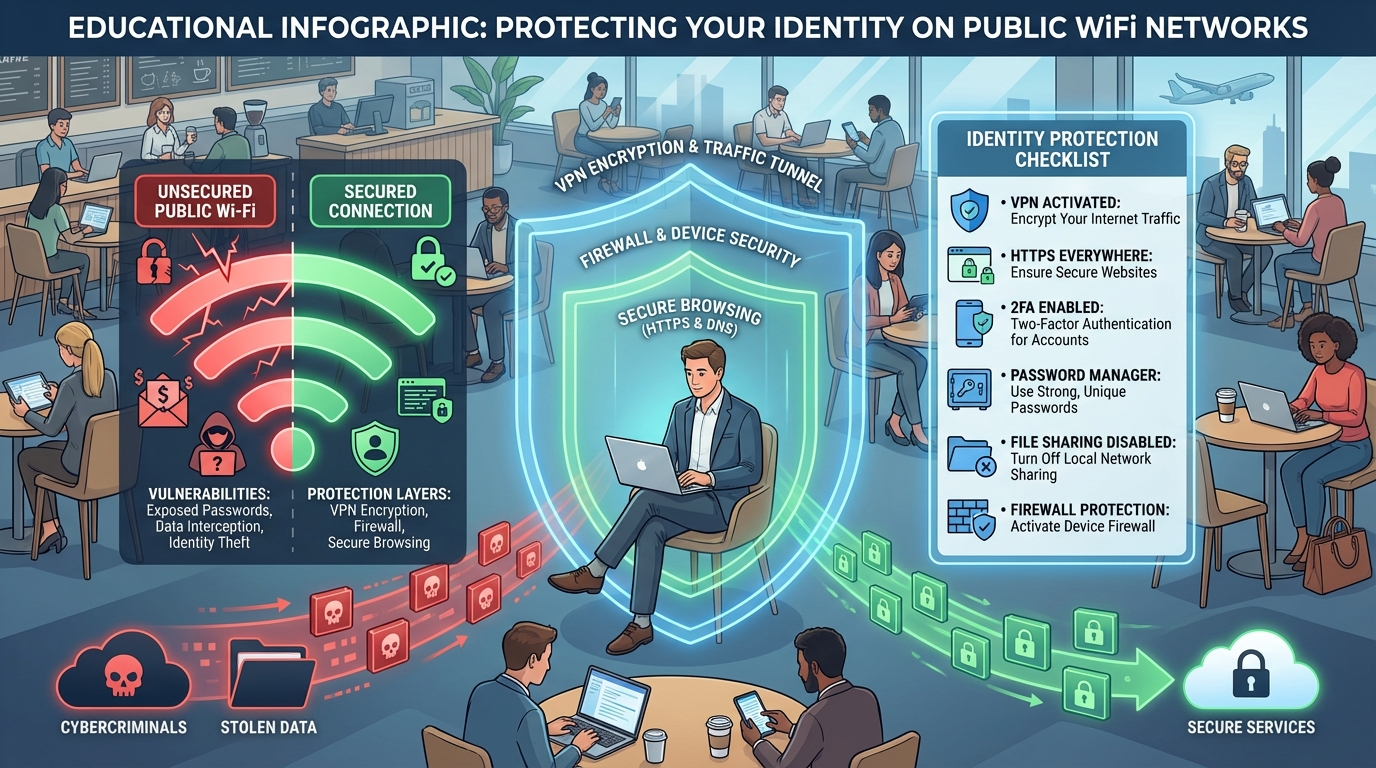
Public Wi-Fi networks are open, convenient, and often free—but that convenience can come at a cost. When you connect, your information flows through shared channels. Hackers can exploit this to intercept sensitive data.
Think of it as shouting private details in a crowded room. Anyone nearby can overhear you. That’s what happens when you don’t protect your identity on public WiFi—your information becomes an open invitation to hackers.
Common risks include:
- Data interception: Hackers steal login credentials or banking details.
- Fake hotspots: Criminals create look-alike networks to lure users.
- Malware injection: Weak connections allow malware installation.
- Session hijacking: Attackers impersonate you online.
Even password-protected networks aren’t always secure, especially when dozens of strangers share the same access point.
How Hackers Target Your Identity on Public WiFi
Understanding how hackers operate helps you better protect identity on public WiFi. Here’s how they gain access to your data and what to watch for.
Packet Sniffing and Data Capture
Hackers use “packet sniffers” to intercept unencrypted data as it travels. This can include usernames, passwords, and financial details. It’s like someone secretly reading every digital note you send.
Fake Access Points and Evil Twins
Cybercriminals create fake Wi-Fi networks named after legitimate ones like “Free Airport WiFi.” Once you connect, everything you do passes through their system. This makes identity theft incredibly easy.
Malware and Phishing Attacks
Pop-ups, fake login screens, and corrupted downloads can infect your device with spyware. Once installed, hackers can monitor your activity long after you disconnect from public Wi-Fi.
Smart Ways to Protect Identity on Public WiFi
You don’t have to stop using public Wi-Fi—you just need to use it wisely. Here are proven ways to secure your data and prevent identity theft.
1. Use a Trusted VPN for Wi-Fi Safety
A Virtual Private Network (VPN) encrypts your data, creating a secure tunnel between your device and the internet. Even if someone intercepts it, they can’t read it. This is one of the most effective ways to protect identity on public WiFi.
Avoid free VPNs, as they may log or sell your data. Instead, choose a reputable provider that prioritizes privacy and encryption.
2. Disable Auto-Connect and Forget Networks
Your phone or laptop might automatically reconnect to previously used networks. Hackers can mimic these to trick your device. Always “forget” networks after use to maintain public Wi-Fi protection.
3. Turn Off File Sharing and Bluetooth
File sharing and Bluetooth can expose your device to nearby hackers. Disable them when using public Wi-Fi to reduce potential access points.
4. Visit Only HTTPS Websites
Before entering any sensitive data, look for “https://” and the padlock icon in your browser. HTTPS encrypts communication between your browser and the site, adding an essential security layer.
5. Avoid Banking or Shopping on Public Networks
If you value your privacy, save transactions for a secure home or mobile network. Avoid entering financial data while connected to public Wi-Fi.
6. Keep Devices and Software Updated
Regular updates patch vulnerabilities that hackers exploit. Keep your system, browsers, and apps updated. Pair this with strong antivirus protection for full Wi-Fi safety.
7. Use Two-Factor Authentication (2FA)
Even if a hacker steals your password, they can’t access your accounts without your phone or code. 2FA adds a final layer of protection for public Wi-Fi users.
Alternative Ways to Protect Identity Without Public WiFi
Sometimes, the best way to stay safe is to skip public Wi-Fi altogether. Use personal or portable options that provide secure connectivity.
- Mobile hotspots: Your smartphone’s data network is far more secure.
- Portable routers: These allow password-protected, private connections.
- Encrypted browsers or plug-ins: Add security features that mask your data.
Investing in these alternatives ensures constant Wi-Fi safety without the risks.
Recognize Signs of Identity Theft from Public WiFi Use
Even with strong precautions, identity theft can happen. The key is early detection.
Warning signs include:
- Unauthorized bank transactions
- Password reset emails you didn’t request
- Suspicious account logins
- Drops in credit score or new accounts in your name
If you notice these, take immediate action—change your passwords, alert your bank, and file reports with credit bureaus or cybercrime authorities.
Why Consistent Awareness Protects Identity on Public WiFi
Protecting your identity online isn’t a one-time task—it’s a habit. Each time you connect to Wi-Fi, think about where you are, who owns the network, and what you’re accessing.
Using VPNs, encrypted sites, and strong passwords helps secure your data. More importantly, awareness and caution turn you into your own best defense.
By practicing safe habits and staying alert, you can enjoy the convenience of public Wi-Fi without putting your privacy at risk.
Conclusion
Public Wi-Fi is convenient, but it’s also a magnet for cybercriminals. When you know how to protect identity on public WiFi, you reduce the chances of becoming their next victim. Use VPNs, avoid risky websites, and keep your software updated.
Your digital identity is your most valuable asset—guard it as carefully as you would your wallet. Stay cautious, stay secure, and browse confidently wherever you go.
FAQ
1. How can I protect identity on public WiFi effectively?
Always use a VPN, connect only to HTTPS sites, and disable sharing features. These steps make your connection safer and your data private.
2. Is it safe to use banking apps on public Wi-Fi?
No. Avoid banking or entering credit card details while connected to public Wi-Fi. Use mobile data or a secure private connection instead.
3. Can antivirus software protect my identity on public WiFi?
Yes. Good antivirus programs detect and block malicious activity, adding an extra shield when browsing on public Wi-Fi.
4. What’s the best way to secure data on Wi-Fi while traveling?
Use a VPN and mobile hotspot instead of public Wi-Fi. Avoid unknown networks and always log out of accounts after use.
5. How do I know if my identity was stolen from public Wi-Fi?
Look for unauthorized logins, new accounts, or strange transactions. Contact your bank and update passwords immediately if you suspect theft.